Haunter: A Bold and Brushed Display Font for Modern Designs
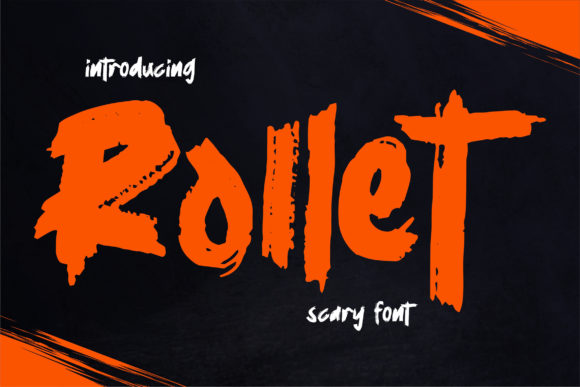
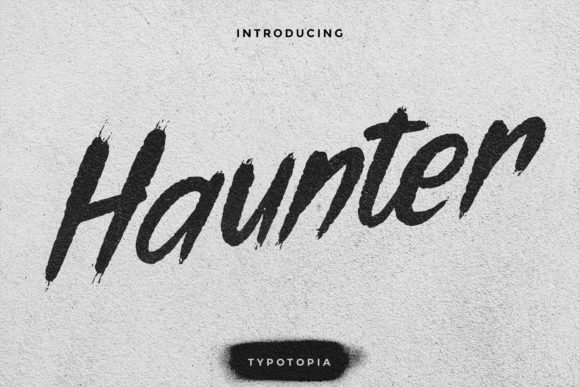
If you're looking to add a trendy, modern touch to your designs, Haunter might be the font you need. This bold and brushed display font is gaining popularity among designers, marketers, and content creators who want to elevate their visual communication without sacrificing readability or style.
Haunter is more than just a font—it's a design choice that can transform the way your message is received. Its natural, hand-brushed look gives it a unique personality, making it ideal for branding, headlines, posters, and digital media. But before you jump into using Haunter, there are a few things you should know to avoid common pitfalls and ensure the best results.
Why Haunter Appeals to Designers and Creators
The appeal of Haunter lies in its versatility and aesthetic. It blends the organic feel of a hand-drawn font with the clean lines of modern typography. This combination makes it suitable for both traditional and digital mediums. Whether you're designing a website, a print ad, or a social media post, Haunter can bring a fresh and contemporary vibe to your project.
Many professionals find Haunter particularly useful for creating eye-catching headlines, logos, and call-to-action buttons. Its bold weight ensures visibility, while the brushed texture adds a sense of movement and energy. However, this same feature can be a double-edged sword if not used correctly.
Common Mistakes When Using Haunter
While Haunter is a powerful tool, it's easy to make mistakes that can undermine its effectiveness. Here are some common errors and how to avoid them:
- Overusing the font: Applying Haunter to every element of your design can lead to visual clutter. It’s best reserved for key elements like headlines or titles rather than body text.
- Ignoring legibility: The brushed effect can sometimes make letters less clear, especially at smaller sizes. Always test Haunter at different sizes and on various backgrounds to ensure it remains readable.
- Mismatching with other fonts: Pairing Haunter with an incompatible font can create a disjointed look. Choose complementary fonts that share similar styles or weights to maintain a cohesive design.
- Not considering context: Haunter works well in certain contexts, such as creative or casual projects, but may not be appropriate for formal or professional settings where a more traditional font is preferred.
How These Mistakes Affect Your Work
Using Haunter incorrectly can lead to poor user experience, reduced readability, and even confusion. For instance, if you use Haunter for body text in a blog post, readers may find it hard to follow the content, which can increase bounce rates and decrease engagement.
Additionally, mismatched fonts can make your design appear unprofessional or hastily put together. In marketing materials, this could damage your brand's credibility and reduce the effectiveness of your message.
Practical Tips for Using Haunter Effectively
To get the most out of Haunter, consider the following tips:
- Use it strategically: Reserve Haunter for headings, logos, or accents rather than for long blocks of text. This ensures it enhances rather than overwhelms your design.
- Test across devices: Make sure Haunter looks good on both desktop and mobile screens. Some fonts render differently depending on the device or browser, so always check how it appears in real-world conditions.
- Pair wisely: If you're using Haunter alongside another font, choose one that complements its style. Sans-serif fonts like Arial or Helvetica can provide a nice contrast and balance.
- Check licensing: Before downloading or using Haunter, verify the licensing terms. Some fonts require payment or have restrictions on commercial use. Always ensure you're allowed to use it for your intended purpose.
Real-World Examples and Better Approaches
Imagine you're designing a poster for a music festival. Using Haunter for the event name will immediately grab attention with its bold and dynamic look. However, if you also use Haunter for the venue details and dates, the overall design might become too busy and hard to read. Instead, pair Haunter with a simpler sans-serif font for the supporting information to keep everything clear and focused.
Another example is using Haunter in a digital newsletter. While it can work well for the subject line or headline, using it for the entire email body would likely confuse readers. Stick to using it for key elements and let a more readable font handle the rest of the content.
What to Check Before Choosing Haunter
Before committing to Haunter, take the time to evaluate whether it's the right fit for your project. Ask yourself these questions:
- Does Haunter align with the tone and message of my project?
- Will it remain legible in different sizes and contexts?
- Is it compatible with the other design elements I'm using?
- Am I following the licensing rules for its use?
By answering these questions, you can make an informed decision that supports both your creative goals and practical needs.
Haunter is a great font when used thoughtfully. By avoiding common mistakes and applying it in the right ways, you can enhance your designs and communicate your message more effectively. Whether you're a beginner or a seasoned designer, taking the time to understand Haunter’s strengths and limitations will help you achieve better results and stand out in your field.